---
title: BoltWise Dashboard
description: BoltWise Dashboard
---
[Skip to content](https://help.getboltwise.com/en/boltwise-helpcenter/boltwise-dashboard#main-content)
English
Show submenu for translations
[](https://app.getboltwise.com)
Open main navigation
Close main navigation
- English
Show submenu for translations
- [Contact us](mailto:support@getboltwise.com)
[Contact us](mailto:support@getboltwise.com)
How can we help you?
- There are no suggestions because the search field is empty.
1. [BoltWise Help Center](https://help.getboltwise.com/en/boltwise-helpcenter?hsLang=en)
2. [Getting started](https://help.getboltwise.com/en/boltwise-helpcenter/getting-started?hsLang=en)
# BoltWise Dashboard
When you log into BoltWise, you'll land on the Dashboard. This is your home base — it gives you a real-time overview of all quoting activity across your organization.
**What you'll see at a glance**
**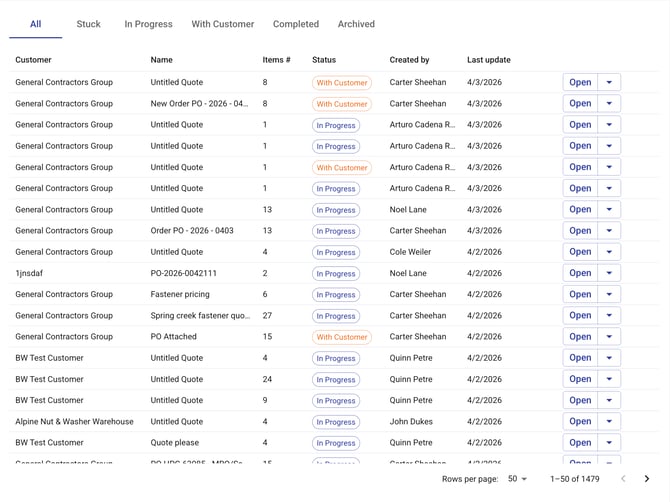**
**Status Types:**
- **Stuck** - quotes created more than 7 days ago that haven't been delivered yet. These need attention.
- **In Progress** - quotes currently being worked on
- **With Customer** - quotes that have been delivered
- **Completed** - combined won, lost, and with customer
- **Archived **- you can archive quotes that you won't be moving forward on to remove them from your "All" tab
**Managing quotes:**
- **Changing a quote's status:** Click the status badge on any row to update it. Available statuses are: In Progress, With Customer, Won, Lost, Error, and Archived.
- Select the dropdown arrow next to the **Open** quote button on any row to flag, archive, or delete a quote. Flagging a quote moves it to the top of the list so it's easy to find.
**Filtering the dashboard:**
- **Created by Me** - Toggle on the **Created by Me** slider to see only the quotes you created, and your metrics
- **Customer **- A searchable, dropdown menu to see only quotes and metrics for a specific customer
**Sorting quotes: **
- By Status: you'll see a tab for each working status (Stuck, In Progress, With Customers, Completed, and Archived)
- Sort quotes by any column, ascending or descending (Customer, Quote Name, Number of Items, Status, Created by, and Last update date)
- Columns can be made wider and narrower
- [FAQs](https://help.getboltwise.com/en/boltwise-helpcenter/faqs?hsLang=en)
- [Getting started](https://help.getboltwise.com/en/boltwise-helpcenter/getting-started?hsLang=en)
- [Quoting](https://help.getboltwise.com/en/boltwise-helpcenter/quoting?hsLang=en)
[](https://app.getboltwise.com)
[mailto:support@getboltwise.com](mailto:support@getboltwise.com)
Copyright © 2026, BoltWise
```json
{
"@context" : "https://schema.org",
"@type" : "VideoObject",
"contentUrl" : "https://242544765.fs1.hubspotusercontent-na2.net/hubfs/242544765/video_assets/332611731173/inherited/web_optimized.mp4",
"dateModified" : "2026-04-14T17:39:51.538Z",
"duration" : "PT1M5.282S",
"height" : 1080,
"name" : "Dashboard Overview",
"thumbnailUrl" : "https://242544765.fs1.hubspotusercontent-na2.net/hubfs/242544765/Knowledge%20Base/Knowledge%20Base%20Videos/Dashboard%20Overview.mp4/medium.jpg",
"uploadDate" : "2026-04-08T17:55:49.557Z",
"width" : 1920
}
```