
Creating a quote from a file:
To create a quote from a file:
-
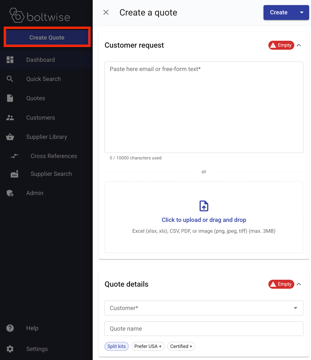
Click Create Quote button in the top left of your browser window
-
The Create a quote tool will slide-out from the right-hand side of your browser
-
You can create quotes in BoltWise from any of the following file types: Excel (xlsx, xls), CSV, PDF, or image (png, jpeg, tiff) (max 3MB)
Drag and drop your file into the uploader.
- OR -
Click into the uploader and a window with your files will open. When you've selected the correct file, click the Open button to pull your file into the BoltWise quote you're working on. - Select the appropriate customer from Quote Details --> Customer
When you export your quote to your ERP, we will push it to their account within your system. - (Optional) Give your quote a name to make it easier to track Quote Details --> Quote Name
- (Optional) If your customer prefers domestic parts, click the Prioritize USA parts+ button. This tells BoltWise to prioritize parts cataloged as domestic.
- (Optional) If your customer wants parts which need certifications, click the Needs certification+ button. This tells BoltWise to prioritize parts in your catalog with certifications.
- (Optional) Click the Split Kits button before creating your quote and BoltWise will auto-detect kits and assemblies, and break them out into individually itemized lines.
- Click the blue Create button in the top right of the quote tool to automatically generate your quote.